Butler 15.0: Filling the gaps - monitor all task types in client-managed Qlik Sense
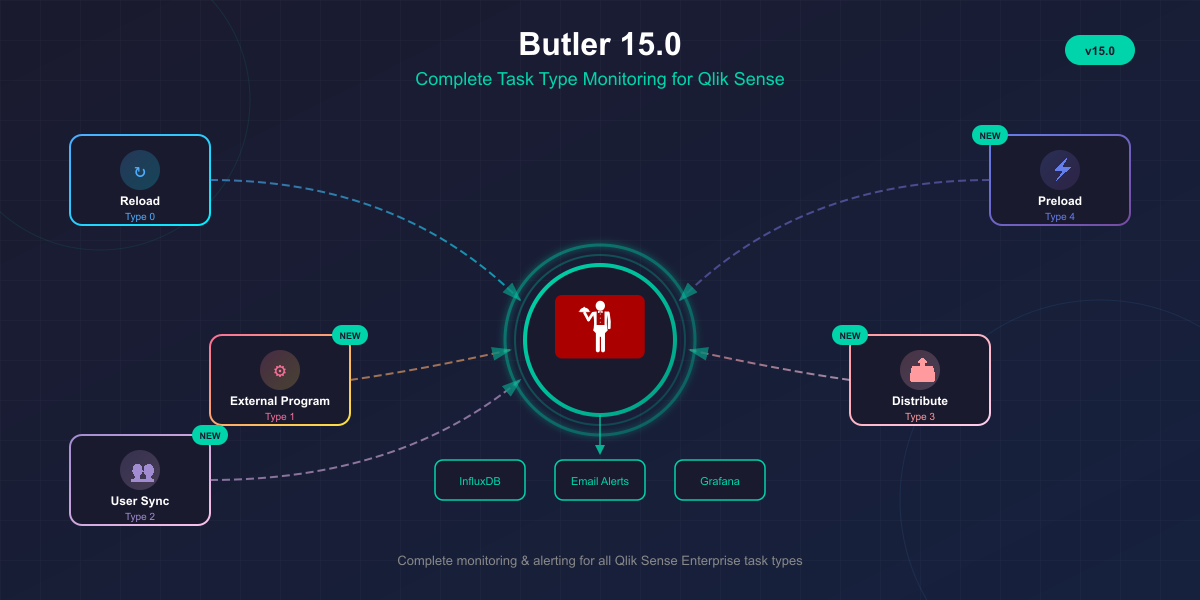
Butler 15.0 is a major release that extends monitoring and alerting to all task types in Qlik Sense Enterprise on Windows. Previously, only reload tasks were fully supported. This release adds comprehensive support for external program tasks, user sync tasks, distribute tasks, and preload tasks.


What's New
If you're using Butler to monitor reload tasks in a Qlik Sense environment, this release means you can now get alerts and metrics for every scheduled task — not just reloads.
External program tasks, preload task, distribution tasks and user sync tasks - all supported with metrics stored in InfluxDB and email alerts where applicable!
InfluxDB Support for All Task Types
The core addition in this release is InfluxDB integration for all five Qlik Sense task types:
| Task Type | Type Code | InfluxDB Support |
|---|---|---|
| Reload | 0 | ✅ (existing) |
| External Program | 1 | ✅ new |
| User Sync | 2 | ✅ new |
| Distribute | 3 | ✅ new |
| Preload | 4 | ✅ new |
Each task type now writes success and failure metrics to dedicated InfluxDB measurements. For example, external_program_task_success, distribute_task_failed, preload_task_success, and so on.
This means you can build Grafana dashboards that show the health of your entire task infrastructure—not just reloads.
Email Alerts for Distribute and Preload Tasks
Beyond metrics, Butler 15.0 adds email notifications for distribute and preload task failures and successes. This uses the same Handlebars templating system as reload task emails, giving you full control over formatting.
New email template files are included:
failed-distribute-qseow.handlebarssuccess-distribute-qseow.handlebarsfailed-preload-qseow.handlebarssuccess-preload-qseow.handlebars
Configure them the same way you'd configure reload task emails—point Butler to your template directory and specify which template file to use for each event type.
Script Log Excerpts in Reload Success Emails
A smaller but useful addition: reload success emails can now include excerpts from the script log.
Previously, script log excerpts were only available for failed and aborted reloads.
Configure the number of lines to include:
Butler:
  emailNotification:
    reloadTaskSuccess:
      headScriptLogLines: 15 # Lines from start of script log
      tailScriptLogLines: 25 # Lines from end of script log
This is useful when you want to verify that expected data was loaded, or confirm row counts logged during the reload.
Breaking Changes
This is a major release with configuration changes. If you're upgrading from Butler 14.x, you'll need to update your config file.
InfluxDB Configuration
The InfluxDB section has been restructured to accommodate all task types. Instead of just reloadTaskFailure and reloadTaskSuccess, there are now separate sections for each task type:
Butler:
  influxDb:
    enable: true
    # ... connection settings ...

    reloadTaskFailure:
      enable: true
    reloadTaskSuccess:
      enable: true

    # New in 15.0.0
    externalProgramTaskSuccess:
      enable: false
    externalProgramTaskFailure:
      enable: false
    userSyncTaskSuccess:
      enable: false
    distributeTaskSuccess:
      enable: false
    distributeTaskFailure:
      enable: false
    preloadTaskSuccess:
      enable: false
    preloadTaskFailure:
      enable: false
The above shows the main changes, under each new section in the configuration file there are some additional properties. Check the production_template.yaml file that is included in the distribution ZIP for a complete config file, or the Butler documentation site.
Email Notification Configuration
Similarly, the email notification section has new subsections for distribute and preload tasks:
Butler:
  emailNotification:
    enable: true
    # ... existing reload task settings ...

    # New in 15.0.0
    distributeTaskSuccess:
      enable: false
      # ... template and recipient settings ...
    distributeTaskFailure:
      enable: false
    preloadTaskSuccess:
      enable: false
    preloadTaskFailure:
      enable: false
XML Log Appender Updates
If you use Butler's UDP-based task failure detection, you need to update your Qlik Sense log appender configuration. The LocalLogConfig.xml file on your Sense servers needs additional filters to detect preload task failures:
<appender name="TaskFailLogger" type="log4net.Appender.UdpAppender">
    <!-- Existing reload task filter -->
    <filter type="log4net.Filter.StringMatchFilter">
        <param name="stringToMatch" value="Max retries reached" />
    </filter>

    <!-- New: Preload task failure filters -->
    <filter type="log4net.Filter.StringMatchFilter">
        <param name="stringToMatch" value="Failed to start session" />
    </filter>
    <filter type="log4net.Filter.StringMatchFilter">
        <param name="stringToMatch" value="Could not reserve an executor for task" />
    </filter>

    <filter type="log4net.Filter.DenyAllFilter" />
    <!-- ... rest of appender config ... -->
</appender>
The complete updated LocalLogConfig.xml is included in the Butler release package.
Bug Fixes
Certificate Loading with --no-qs-connection
The --no-qs-connection command line option now correctly skips loading Qlik Sense API certificates. Previously, Butler would still attempt to load certificates even when running in isolated mode, causing errors if the certificate files didn't exist.
This fix is useful when running Butler in development environments or CI/CD pipelines without Qlik Sense connectivity.
Windows Service Monitoring Hostname Validation
Butler now validates hostnames for Windows service monitoring during startup. If a service host is misconfigured (e.g., invalid hostname format), you'll get a clear error message instead of cryptic failures at runtime.
Upgrade Process
-
Back up your config file before making any changes.
-
Add the new InfluxDB sections for external program, user sync, distribute, and preload tasks. Set them to
enable: falseinitially if you don't need them yet. -
Add the new email notification sections for distribute and preload tasks if you want email alerts for these task types.
-
Update your LocalLogConfig.xml on each Qlik Sense server if you use UDP-based task detection. Add the preload task failure filters shown above.
-
Copy the new email templates (
failed-distribute-qseow.handlebars, etc.) to your template directory if you plan to use them. -
Restart Butler and verify startup logs for any configuration errors.
The upgrade documentation has complete details and the full config file structure.
Resources
- Butler documentation
- GitHub release
- Config file reference
- InfluxDB metrics reference
- Task type constants reference
Butler is open source and free to use. If you find it useful, consider giving it a ⭐ on GitHub.